CLI::UI hidden gems 💎
Explore the hidden gems of CLI::UI. Adding links, printing tables & separating frames for better command-line interface experience.
CLI::UI is a Ruby gem designed to enhance command-line interfaces (CLIs) by providing a framework for formatting and styling text output. It integrates seamlessly with other Ruby gems like Thor, expanding its capabilities further.
There are a couple of cool undocumented features, here are a couple of them 👇
Adding links 🔗#

puts CLI::UI.link('https://logs.panos.codes', 'My blog')Printing tables#

CLI::UI formating can be combiented with the Thor gem, that give us access to the print_table method
   row_1 = [
    CLI::UI.fmt("{{red:Header}}"),
    CLI::UI.fmt("{{red:Value}}"),
  ]

  row_2 = [
    CLI::UI.fmt('{{info:Accept-Encoding:}} '),
    CLI::UI.fmt('{{white:gzip, deflate, br, zstd}}')
  ]

  row_3 = [
    CLI::UI.fmt('{{info:Accept:}} '),
    CLI::UI.fmt('{{white:text/html,application/xhtml+xml,application/xml;q=0.9,image/avif,image/webp,image/apng,*/*;q=0.8}}')
  ]

  row_4 = [
    CLI::UI.fmt('{{info:Cache-Control:}} '),
    CLI::UI.fmt('{{white:no-cache}}')
  ]

  Thor::Shell::Basic.new.print_table([ row_1, row_2, row_3, row_4])
Seperating frames#
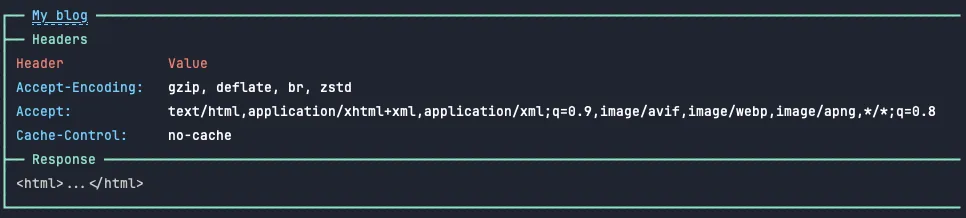
CLI::UI.Frame gives us a convitient .divider method
CLI::UI::Frame.open(CLI::UI.link('https://logs.panos.codes', 'My blog'), timing: false) do
  CLI::UI::Frame.divider('Headers', frame_style: :bracket)
  Thor::Shell::Basic.new.print_table([ row_1, row_2, row_3, row_4])

  CLI::UI::Frame.divider('Response')
  puts "<html>...</html>"
end